CutLuy API
CutLuy lets you accept QR payments in Cambodia with a simple REST API, real-time webhooks, and a hosted, branded checkout page. Create a payment, show the customer a QR code, and get notified the moment it's paid.
The API is organized around a single resource — the payment. All requests use HTTPS, are authenticated with an API key, and return JSON. Amounts are in USD.
Authentication
Authenticate every request with your secret API key in the Authorization header as a bearer token. Create and manage keys under Dashboard → API keys. Each key belongs to one store; the key alone identifies which store (and payment link) a request acts on.
curl https://cutluy.com/v1/payments/PUETcMUOKStjZsCb6zAl8kg9fMRGM85x \
  -H "Authorization: Bearer ck_live_..."
Keep secret keys (ck_live_…) on your server — never in client-side code. Missing or invalid keys return 401 unauthorized.
Quickstart
Create a payment for $1.50. You don't need a payment-link id — CutLuy uses your store's link automatically.
curl https://cutluy.com/v1/payments \
  -H "Authorization: Bearer ck_live_..." \
  -H "Content-Type: application/json" \
  -d '{ "amount": 1.50, "reference_id": "order_1024" }'
Redirect the customer to checkout_url (a hosted, branded page) or render qr_string as a QR in your own UI. When they pay, the payment's status becomes paid and a webhook fires.
Create a payment
Creates a QR payment and returns it with a QR string and checkout URL.
| Parameter | Type | Description |
|---|---|---|
| amount | number, required | Amount to charge, in USD. Minimum 0.01. |
| reference_id | string, optional | Your own order id (≤ 255 chars). Echoed back and included in webhooks. |
| metadata | object, optional | Arbitrary JSON, returned as-is on the payment. |
| idempotency_key | string, optional | Safely retry without creating duplicates (≤ 255). May also be sent as the Idempotency-Key header. |
Request
curl https://cutluy.com/v1/payments \
  -H "Authorization: Bearer ck_live_..." \
  -H "Content-Type: application/json" \
  -d '{ "amount": 1.50, "reference_id": "order_1024" }'
Response · 201 Created (or 200 on an idempotent replay)
{
  "id": "PUETcMUOKStjZsCb6zAl8kg9fMRGM85x",
  "status": "pending",
  "amount": "1.50",
  "currency": "USD",
  "reference_id": "order_1024",
  "qr_string": "00020101021229...6304AB12",
  "checkout_url": "https://cutluy.com/pay/PUETcMUOKStjZsCb6zAl8kg9fMRGM85x",
  "approved_at": null,
  "created_at": "2026-07-09T12:00:00.000Z",
  "expires_at": "2026-07-09T12:05:00.000Z"
}
Retrieve a payment
Fetch the current state of a single payment — poll this if you're not using webhooks.
curl https://cutluy.com/v1/payments/PUETcMUOKStjZsCb6zAl8kg9fMRGM85x \
  -H "Authorization: Bearer ck_live_..."
List payments
Returns your store's payments, newest first, under a data array.
| Query param | Type | Description |
|---|---|---|
| status | string, optional | Filter by status (e.g. paid). |
| limit | number, optional | How many to return (default 20, max 100). |
curl "https://cutluy.com/v1/payments?status=paid&limit=20" \
  -H "Authorization: Bearer ck_live_..."
Check usage
Where your account stands in the period it's in right now — the same numbers that decide whether a create call is accepted, so read them from here rather than counting payments yourself.
Quota is per account and pooled across every store, so any of your API keys returns the same figures. The period is 30 days from the day you last paid — not a calendar month — and limit already includes any transactions carried over from an early renewal.
curl https://cutluy.com/v1/usage \
-H "Authorization: Bearer ck_live_..."{
"plan": "pro",
"limit": 5000,
"used": 1284,
"remaining": 3716,
"period_start": "2026-09-12T04:31:07.000Z",
"period_end": "2026-10-12T04:31:07.000Z"
}| Field | Type | Description |
|---|---|---|
| plan | string | Plan in effect now — free once a paid period lapses. |
| limit | number | Transactions allowed this period, including carryover. |
| used | number | Paid transactions so far this period. |
| remaining | number | Never negative. At 0 a create returns 402. |
| period_start | string | ISO 8601 start of the current period. |
| period_end | string | ISO 8601 end — when used resets to 0. |
The payment object
| Field | Type | Description |
|---|---|---|
| id | string | Unique payment id (used in checkout_url and lookups). |
| status | string | One of pending, scanned, paid, expired, failed. |
| amount | string | Decimal string, e.g. "1.50". |
| currency | string | Always "USD". |
| reference_id | string | null | The reference you supplied. |
| qr_string | string | Raw QR (EMV) payload — render as a QR for scan-to-pay. On create/list. |
| checkout_url | string | Hosted branded checkout page. On create/list. |
| metadata | object | null | Metadata you attached. On retrieve. |
| approved_at | string | null | ISO 8601 time the payment was paid. |
| created_at | string | ISO 8601 creation time. |
| expires_at | string | ISO 8601 expiry (~5 minutes after creation). |
Payment statuses
| Status | Terminal | Meaning |
|---|---|---|
| pending | no | Created; waiting for the customer to scan and pay. |
| scanned | no | The QR was scanned; the customer is confirming in their banking app. |
| paid | yes | Paid successfully. Counts toward your quota and fires payment.completed. |
| expired | yes | The QR expired unpaid (~5 minutes). |
| failed | yes | The payment failed. |
Hosted checkout & redirects
Every payment has a checkout_url — a mobile-friendly, branded page (your store logo, colors, and support email) that shows the QR code, a countdown, and live status. It even deep-links into banking apps on mobile.
Set success and failure redirect URLs under Settings. After a terminal payment CutLuy sends the customer there, appending ?status=success|failed&payment_id=…&reference_id=… so your page knows which order it was.
Build your own QR card
If you'd rather keep customers inside your own app than send them to checkout_url, render the QR yourself. This is exactly how CutLuy's hosted checkout card is built — a red header, a torn-ticket amount row, and the riel medallion centred over the code. Shoppers recognise that shape, so matching it raises completion.
1. Render the QR at ECC level H
payment.qr_string is the raw QR (EMVCo) payload — hand it to any QR library. Do it on the server so the markup ships with the page and the code never flashes in.
// npm i uqr
import { renderSVG } from "uqr"

// payment.qr_string is the raw QR payload from POST /v1/payments.
// Render it at error-correction level H — the riel medallion covers the
// middle of the code, and only H survives that much occlusion.
const qrSvg = renderSVG(payment.qr_string, { ecc: "H" })
2. The card
Three stacked blocks: header, amount, QR. The folded corner is a CSS border triangle rather than an image, and the QR fills a aspect-square box so it stays crisp at any width. Keep the card on a white surface even in dark mode — scanners need the quiet zone and the light/dark contrast of the modules.
// The QR is a raw <svg> string, so it is injected and stretched to fill
// its square container. Everything else is plain markup + Tailwind.
export function PaymentCard({ qrSvg, amount, currency, merchantName, logoUrl }) {
  return (
    <div className="mx-auto w-full max-w-sm">
      <div className="overflow-hidden rounded-2xl bg-white shadow-xl">
        {/* 1. Red header with the wordmark */}
        <div className="flex items-center justify-center bg-red-500 px-4 py-3.5">
          <Wordmark />
        </div>

        {/* 2. Merchant + amount, split off by a dashed "tear" line,
              with the folded corner drawn as a CSS border triangle */}
        <div className="relative border-b border-dashed border-gray-300 px-6 py-4 pb-2.5">
          <div className="absolute -top-px right-0 h-0 w-0 border-t-[24px] border-l-[24px] border-t-red-500 border-l-transparent" />
          <div className="flex items-center gap-2">
            {logoUrl && <img src={logoUrl} alt="" className="size-5 rounded-sm object-contain" />}
            <h3 className="text-sm text-slate-700">{merchantName}</h3>
          </div>
          <div className="flex items-end gap-2">
            <h2 className="text-2xl font-bold text-gray-800">{amount}</h2>
            <span className="mb-1 text-sm font-medium text-slate-600">{currency}</span>
          </div>
        </div>

        {/* 3. Square QR + the riel medallion centred on top */}
        <div className="relative flex items-center justify-center">
          <div className="aspect-square w-full p-6">
            <div className="[&_svg]:h-full [&_svg]:w-full"
                 dangerouslySetInnerHTML={{ __html: qrSvg }} />
          </div>
          <RielMedallion className="absolute top-1/2 left-1/2 -translate-x-1/2 -translate-y-1/2" />
        </div>
      </div>

      <p className="mt-4 text-center text-sm text-slate-600">
        Scan with any banking app
      </p>
    </div>
  )
}
3. Handle every status
A card that only ever shows a QR is the most common mistake. Cover all five statuses, and swap the QR for a clear panel the moment the payment is scanned, paid, expired, or failed.
// Swap the QR out for a state panel once the payment is terminal —
// never leave a live QR on screen after it is paid or expired.
const done = status === "paid"
const scanned = status === "scanned"
const isExpired = status === "expired" || status === "failed"
const showQr = !done && !scanned && !isExpired

{done ? (
  <Panel icon={<CheckCircle2 className="size-8 text-green-600" />}
         title="Payment received" hint="You can close this page." />
) : isExpired ? (
  <Panel icon={<Clock className="size-8 text-orange-500" />}
         title="Payment expired" hint="This QR code is no longer valid." />
) : scanned ? (
  <Panel icon={<CheckCircle2 className="size-8 text-green-600" />}
         title="QR scanned" hint="Confirm the payment in your banking app." />
) : (
  <QrWithMedallion svg={qrSvg} />
)}

// The medallion must only render while the QR does — overlaying it on a
// state panel looks broken.
{showQr && <RielMedallion className="absolute top-1/2 left-1/2 -translate-x-1/2 -translate-y-1/2" />}
4. Keep it live
Poll for status from your own backend (never expose your API key to the browser) and stop polling on a terminal status. A webhook still does the actual fulfilment — polling is only there to move the UI.
// Keep the card live: poll your own endpoint (which reads the payment
// via GET /v1/payments/:id) and stop as soon as the status is terminal.
const TERMINAL = new Set(["paid", "expired", "failed"])

useEffect(() => {
  if (TERMINAL.has(status)) return
  const t = setInterval(async () => {
    const res = await fetch(`/orders/${orderId}/status`)
    const { status: next } = await res.json()
    setStatus(next)
  }, 3000)
  return () => clearInterval(t)
}, [status, orderId])| Do | Why | Detail |
|---|---|---|
| Error correction H | The medallion covers ~7% of the code | Anything lower fails to scan once you overlay the centre. |
| White background | Scanner contrast | Never invert the QR or tint it with the brand colour. |
| Keep the quiet zone | Scanners need the margin | Pad the QR container; don't crop to the modules. |
| Show the amount | Trust | Customers verify the amount on screen before confirming. |
| Show a countdown | Expectation | Expired QRs are the top support ticket without one. |
QR image (SVG)
Or skip the card entirely: put a QR string in a URL and get the finished card back as an SVG. Free, no API key, and it works with any valid payment QR — not just ones created through CutLuy.
:qr is the raw payload, percent-encoded. Same string, same image — so it's cached immutably and safe to hot-link.
// Any valid payment QR string works — here, the one from POST /v1/payments.
const src =
`https://cutluy.com/api/render/khqr/${encodeURIComponent(payment.qr_string)}.svg`<!-- Drop it anywhere an image goes: HTML, Markdown, invoices, chat -->
<img
src="https://cutluy.com/api/render/khqr/00020101021229330016cutluy_demo%40bkrt010900000000052045999530384054041.505802KH5911CutLuy%20Demo6010Phnom%20Penh62140110order_102463045F4B.svg"
alt="Scan to pay 1.50 USD"
width="360"
/>curl -sS "https://cutluy.com/api/render/khqr/00020101021229330016cutluy_demo%40bkrt010900000000052045999530384054041.505802KH5911CutLuy%20Demo6010Phnom%20Penh62140110order_102463045F4B.svg" -o qr.svg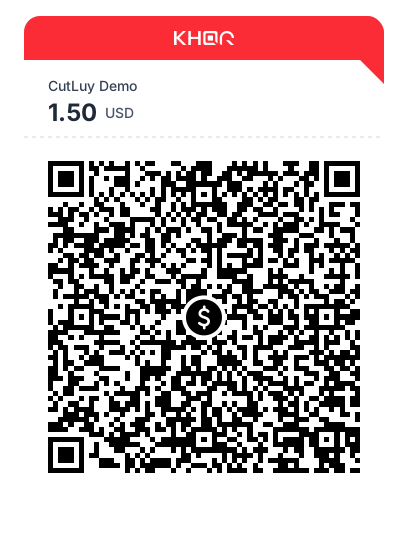
Merchant name, amount and currency come from the payload itself. The CRC and required tags are checked first, so a corrupted string returns 400 invalid_khqr rather than an image that won't scan. A static QR with no amount shows just the currency.
| Field | Type | Description |
|---|---|---|
| Content-Type | image/svg+xml | Self-contained; CORS * and a strict CSP. |
| Cache-Control | immutable, 1 year | Edge serves repeats without hitting CutLuy. |
| Rate limit | 120 / min / IP | Counts uncached renders only (distinct strings). |
| 400 invalid_khqr | JSON error | Bad CRC, malformed TLV, missing tags, or > 512 chars. |
Webhooks
Add endpoints under Dashboard → Webhooks. CutLuy POSTs a JSON event to each enabled endpoint when a payment changes state.
| Event | Fires when | Payment status |
|---|---|---|
| payment.completed | A payment is paid | paid |
| payment.scanned | The QR is scanned | scanned |
| payment.expired | A payment expires unpaid | expired |
| payment.failed | A payment fails | failed |
Each request carries an X-CutLuy-Event header and an X-CutLuy-Signature header. Respond with any 2xx to acknowledge; anything else (or a timeout) is retried with exponential backoff up to 8 times. You can also resend any delivery from the dashboard, or fire a test event with Send test.
Event payload
{
  "id": "b3f1c2a0-9e2d-4a1b-8c7f-1e2d3c4b5a6f",
  "type": "payment.completed",
  "created": "2026-07-09T12:03:11.000Z",
  "data": {
    "payment": {
      "id": "PUETcMUOKStjZsCb6zAl8kg9fMRGM85x",
      "status": "paid",
      "amount": "1.50",
      "currency": "USD",
      "reference_id": "order_1024",
      "metadata": null,
      "approved_at": "2026-07-09T12:03:10.000Z"
    }
  }
}
Verifying webhook signatures
The X-CutLuy-Signature header looks like t=1720526591,v1=<hex>. Compute an HMAC-SHA256 of `${t}.${rawBody}` with your endpoint's signing secret and compare it to v1. Always use the raw request body, compare in constant time, and reject events with an old timestamp.
import express from "express"
import crypto from "node:crypto"

const app = express()
const SECRET = process.env.CUTLUY_WEBHOOK_SECRET

// IMPORTANT: verify against the RAW request body.
app.post(
  "/webhooks/cutluy",
  express.raw({ type: "application/json" }),
  (req, res) => {
    const header = req.get("X-CutLuy-Signature") ?? ""
    const parts = Object.fromEntries(header.split(",").map((p) => p.split("=")))
    const rawBody = req.body.toString("utf8")

    const expected = crypto
      .createHmac("sha256", SECRET)
      .update(`${parts.t}.${rawBody}`)
      .digest("hex")

    const fresh = Math.abs(Date.now() / 1000 - Number(parts.t)) < 300 // 5 min
    const valid =
      parts.v1 &&
      fresh &&
      crypto.timingSafeEqual(Buffer.from(parts.v1), Buffer.from(expected))

    if (!valid) return res.status(400).send("invalid signature")

    const event = JSON.parse(rawBody)
    if (event.type === "payment.completed") {
      // ✅ fulfill the order → event.data.payment.reference_id
    }
    res.sendStatus(200)
  },
)
Errors
Errors return the right HTTP status and a JSON body with a machine-readable error code and a human message.
{ "error": "amount_too_low", "message": "Minimum amount is 0.01" }| Code | HTTP | When |
|---|---|---|
| unauthorized | 401 | Missing or invalid API key. |
| quota_exceeded | 402 | Transaction limit for the current period reached. |
| rate_limited | 429 | Too many requests — back off and retry (see Retry-After). |
| invalid_request | 400 | The request body failed validation. |
| invalid_amount | 400 | Amount has more than 2 decimal places. |
| invalid_status | 400 | Unknown status in the list filter. |
| payload_too_large | 413 | Request body exceeds 5 MB. |
| amount_too_low | 400 | Amount is below 0.01. |
| amount_too_high | 400 | Amount is above the link's maximum. |
| payment_link_not_found | 404 | No payment link for your store. |
| payment_link_disabled | 400 | The store's payment link is disabled. |
| payment_not_found | 404 | No such payment for your store. |
| method_not_allowed | 405 | Wrong HTTP method for the endpoint. |
| payment_provider_error | 502 | The payment provider was unreachable — retry. |
Rate limits & plans
A successful (paid) payment counts as one transaction. Quota covers a 30-day period and is shared across all stores on your account. Paid plans run 30 days from the day you pay, so the period resets on that date rather than on the 1st of the month. When you hit the limit, creating a payment returns 402 quota_exceeded until the period resets or you upgrade.
You can also just buy another month early. Doing so starts a fresh 30-day period from that day, and any transactions left unused in the period it replaces are added on top of the new allowance — so you're never penalised for renewing before you run out.
| Plan | Included / month | Stores | Price |
|---|---|---|---|
| Free | 50 transactions | 3 | $0 |
| Starter | 1,000 transactions | 10 | $9 / mo |
| Pro | 5,000 transactions | 25 | $29 / mo |
| Scale | 15,000 transactions | 100 | $59 / mo |
| Enterprise | 100,000 transactions | 500 | $200 / mo |
Upgrade any time under Billing — paid with a QR payment, of course.
Separately from your monthly quota, the API is rate limited per API key: 60 payment creations per minute and 600 reads per minute. Exceeding either returns 429 rate_limited with a Retry-After header and X-RateLimit-* headers — wait for the window to reset rather than retrying immediately. Request bodies are capped at 5 MB, and metadata at 1,000 top-level keys, 1 MB total, and 8 levels of nesting.